 StockFinch
StockFinch ডাউনলোডDownload StockFinch
১৪ দিন ফ্রি ট্রায়াল · কার্ড লাগবে না · Windows 10/11 14-day free trial · No card needed · Windows 10/11
এটি কম্পিউটারের সফটওয়্যারThis is computer software
StockFinch Windows কম্পিউটারে চলে, মোবাইলে নয়। লিংকটা নিজের কাছে পাঠিয়ে রাখুন, পরে কম্পিউটারে খুলুন। StockFinch runs on Windows computers, not phones. Send yourself the link and open it on your computer.
প্রশ্ন আছে? WhatsApp-এ জিজ্ঞেস করুন Questions? Ask us on WhatsApp
যা লাগবেRequirements
- Windows 10 বা 11 (64-bit) কম্পিউটারA Windows 10 or 11 (64-bit) computer
- চালু করার সময় একবার ইন্টারনেটInternet once, to activate
- আলাদা কোনো সফটওয়্যার লাগবে না; অ্যাডমিন পাসওয়ার্ডও লাগবে নাNo other software needed; no administrator password needed
ইনস্টল করার ধাপHow to install
ডাউনলোড করা ফাইলটি খুলুনOpen the downloaded file
"Downloads" ফোল্ডারে StockFinch-Setup-1.1.0.0.exe-এ ডাবল-ক্লিক করুন।Double-click StockFinch-Setup-1.1.0.0.exe in your Downloads folder.
"More info" চাপুনClick "More info"
"Windows protected your PC" লেখা নীল বক্সে "More info" লেখায় চাপুন।On the blue "Windows protected your PC" box, click "More info".
"Run anyway" চাপুনClick "Run anyway"
প্রকাশক (publisher) ও ফাইলের নাম দেখে "Run anyway" চাপুন।Check the file name, then click "Run anyway".
Next → Install → FinishNext → Install → Finish
সাধারণ সেটিং রেখেই এগোন। শেষে "Launch StockFinch" টিক দেওয়া থাকলে অ্যাপ খুলে যাবে।Keep the default settings. With "Launch StockFinch" ticked, the app opens at the end.
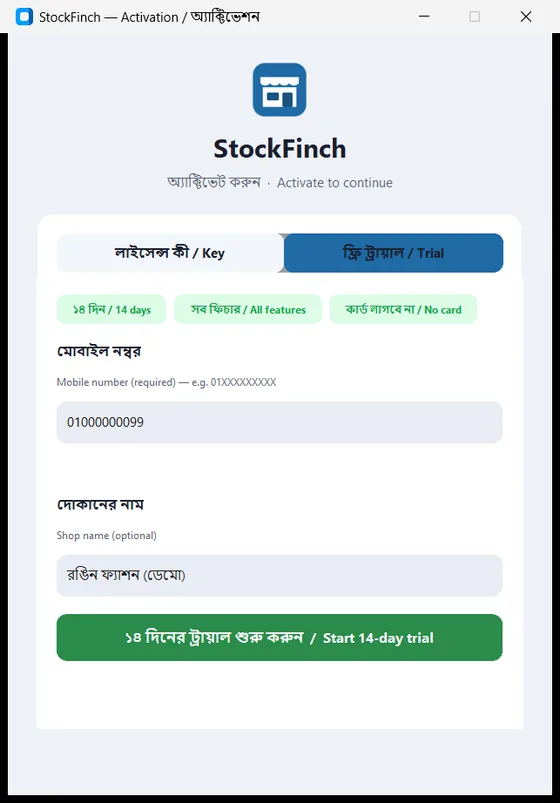
ফ্রি ট্রায়াল শুরু করুনStart your free trial
"ফ্রি ট্রায়াল / Trial" ট্যাবে আপনার মোবাইল নম্বর (১১ সংখ্যা) ও দোকানের নাম দিয়ে "১৪ দিনের ট্রায়াল শুরু করুন" চাপুন। লাইসেন্স কী থাকলে "Key" ট্যাবে লিখুন। On the "Trial" tab, enter your 11-digit mobile number and shop name, then press "Start 14-day trial". Have a license key? Enter it on the "Key" tab.
কোথাও আটকে গেলে WhatsApp করুন — সাধারণত কয়েক ঘণ্টার মধ্যে উত্তর দিই। Stuck? Message us on WhatsApp — we usually reply within a few hours.